
AI PHOTO & VIDEO LAB · LESSON 01 OF 16 · FREE TO READ
Your first image in twenty minutes
Pick your tool, paste one prompt exactly as written, and learn to see the five tells before you touch anything.
There is a specific kind of image the internet cannot stop looking at. It looks accidental. Flash blown out, grain heavy, a face caught mid-laugh, a stranger’s shoulder in the frame. It looks expensive because whoever is in it does not care that you are watching. That look used to need a real lens, a real subject and a real ticket to the party. It doesn’t anymore. This course is the compressed version of what took me months to figure out, and it is written for someone who has never generated a usable image in their life.
Two rules run through the whole thing. Every brand you dress people in is invented, so nobody can claim you sold their product. And label AI work as AI work, everywhere, because the accounts winning this niche lead with it instead of hiding it. The last lesson covers the platform rules; for now, just know they exist.
Pick your tool
You need one place to generate. Two work, and everything in this course runs on both. ChatGPT is the cheaper, simpler path: it now ships OpenAI’s Images 2.5 model on every plan, it takes reference photos, it edits an image you already made, and the prompt assistant from lesson three lives in the same window. Higgsfield costs a little more and gives you a menu: Nano Banana Pro and GPT Image 2.5 for stills, Seedream and Soul for people and fashion, and Kling, Veo and Seedance for video. If you know you want video, start there. If you just want your first great still tonight, start in ChatGPT.
Set up in five minutes
IN CHATGPT · THE CHEAPER PATH
- Open chatgpt.com and sign in. Free works for testing; Plus (about twenty dollars a month) removes the daily image cap.
- Start a new chat. Type: Generate this image in portrait 3:4, then paste the whole prompt below it.
- When the image appears, open it full size and download it. Keep the chat open: you will edit this same image later by replying to it.
- Free tier limits change; if you hit the cap, wait or upgrade. Nothing in this course needs an add-on.
IN HIGGSFIELD · MORE MODELS, PLUS VIDEO
- Go to higgsfield.ai, sign in, open Image and pick a model. Nano Banana Pro is the one these prompts were tuned on; GPT Image 2.5 Flare is the other strong choice. Starter is about nineteen dollars a month.
- Set the aspect ratio in the interface (portrait 3:4 for this one), paste the prompt, check the credit cost shown, generate.
- Download the result at full size. Higgsfield keeps a history, but save your own copy with the prompt anyway.
- Later lessons use Edit (inpaint) and Video (Kling 3.0) inside the same account.
The five tells
Before you write a single prompt, understand why most AI images fail. Nobody consciously analyzes a photo. They feel wrongness in half a second, and five things trigger it. Every prompt in this course is engineered to kill all five.
- TELL 1
Perfect skin
Real skin has pores, oil, uneven tone, stray hairs and texture that catches flash. AI defaults to airbrushed. Every prompt explicitly demands the imperfection back.
- TELL 2
Studio lighting in a candid scene
A photo “caught” on a sidewalk at one in the morning cannot be lit like a Vogue editorial. The light source has to match the story: on-camera flash, streetlamps, phone screens, a window.
- TELL 3
Composition that is too good
Real candid photos are slightly off: cropped elbows, tilted horizons, a shoulder intruding. Perfect framing reads as staged.
- TELL 4
A clean, empty world
Real environments have clutter: receipts, cables, half-empty glasses, fingerprints on glass. Empty backgrounds read as rendered.
- TELL 5
No optical defects
Every real camera leaves fingerprints: grain, noise, chromatic aberration, motion blur, flare, uneven exposure. A technically flawless image is the biggest tell of all.
Generate this one first
Paste it exactly. Do not edit anything yet; you are learning what the baseline looks like. Expect the first output to be close but not perfect. Most images in this course took three to eight attempts to land. That is the process, not a failure.
The festival night (paste as written)
Creative Direction & Mood
Ultra-realistic, hyper-detailed candid documentary image of Rihanna and A$AP Rocky moving through a crowded music festival at night, caught mid-action by an intrusive paparazzi camera. Raw, chaotic, spontaneous energy; unposed body language; close physical proximity; intense nightlife atmosphere with subtle tension and excitement.

Composition & Framing
Shot from very close range with a 28mm wide-angle lens, slight edge distortion, tilted framing, imperfect crop, and partially obstructed foreground figures. She is slightly ahead, turning toward him while walking; he leans closer as if speaking over the music. Festival guests press around them, some blurred by movement. Uneven focus, slight motion blur, accidental framing, no formal posing.

Lighting
Harsh direct on-camera flash overpowering the scene, blown highlights on faces, jewelry, and fabric, with deep crushed shadows behind them. Minimal ambient light from distant stage LEDs, vendor signs, and scattered phone screens. Flash falloff creates a near-black background with isolated fragments of the crowd.

Setting & Background
Outdoor music festival after dark, dense crowd, metal barricades, trampled grass, discarded cups, wristbands, security staff, temporary fencing, distant stage haze, and faint colored beams cutting through smoke. Background remains dark, cluttered, and only partially visible through flash exposure.

Subjects & Details
Rihanna has a natural expression, eyes slightly narrowed reacting to the flash, realistic skin texture with visible pores, fine lines, freckles, uneven tone, subtle oil, perspiration, and small imperfections. Beside her, A$AP Rocky has braided hair, realistic skin texture, visible pores, faint blemishes, beard texture, sweat, and natural asymmetry. Both appear caught in a private moment while navigating the crowd.

Wardrobe & Styling
She wears an oversized distressed leather festival jacket layered over a fitted dark top, statement jewelry from an invented label, worn boots, and practical but fashion-forward accessories. He wears layered streetwear with a textured utility jacket, loose trousers, visible chains, sterling rings, and festival wristbands. Clothing looks worn, creased, slightly dusty, and affected by heat and movement.

Objects & Interaction
She holds a phone and a half-finished drink while he keeps one hand near her back to guide her through the crowd. Security personnel create a narrow path. Nearby attendees raise phones, turn toward the flash, or continue dancing. Loose wristbands, condensation on cups, scratched phone cases, and smudged sunglasses add realism.

Textures & Micro-details
Extreme tactile detail: pores, sweat beads, flyaway hairs, makeup settling into skin texture, fabric fibers, leather creases, dust on shoes, fingerprints on phones, scratched jewelry, damp hair near the temples, chipped nail polish, grass stains, condensation, airborne dust, stage smoke, and tiny reflective particles caught by flash. No beauty retouching, no airbrushed skin, no synthetic rendered look, no overly polished finish, no doll-like texture, no idealized facial symmetry.

Color Grading & Mood
High-contrast raw digital color with cool black shadows, harsh neutral flash, muted skin warmth, occasional red and blue festival light contamination, slight green cast in shadow areas, and desaturated background tones. Gritty, nocturnal, invasive, immediate.

Post-processing
Visible high-ISO grain, digital noise, mild chromatic aberration, JPEG compression artifacts, clipped highlights, crushed blacks, uneven white balance, subtle sensor bloom, slight lens smear, imperfect sharpness, and realistic motion blur. Preserve raw camera imperfections and avoid polished editorial treatment.

Overall Impression
A brutally immediate, flash-heavy festival photograph that feels accidental, intimate, and slightly intrusive: Rihanna and A$AP Rocky caught navigating a chaotic nighttime crowd with authentic skin, lived-in clothing, imperfect movement, and intense paparazzi documentary realism.

Negative prompt
natural lighting, daylight, clean background, posed, studio, perfect skin, CGI, 3D render, plastic, cartoon, anime, editorial, fashion shoot, soft lighting, desaturated pastel, beauty retouching, symmetrical lighting
Set the aspect ratio in the interface, not in the prompt. The negative prompt goes in Higgsfield’s negative field if the model shows one; in ChatGPT, paste it as a final line starting with “Avoid:”.
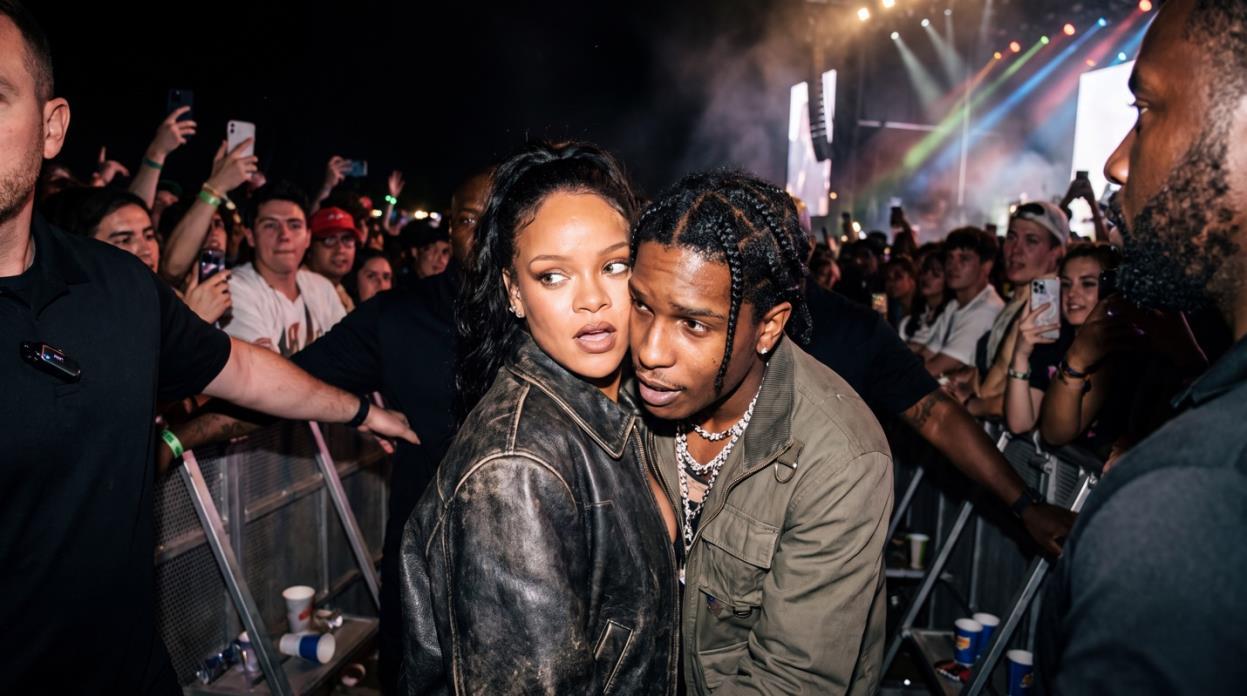
Now look at it like a cynic
Open it at full size. Go through the five tells in order and write down which ones survived: is the skin waxy, is the light too clean, is the framing too centered, is the world too empty, is there any grain at all. That list is your first lesson in prompt editing, and you will fix the biggest item in lesson eleven. For now, run it once more with the same prompt and notice how much changes between two identical requests. That variance is why we change one thing at a time.
Follow the structure exactly and you will be producing work people mistake for real photography by the end of your first week.N.V.