Launch your own brand.
Create product-page images, launch visuals and social content with the product you already have. Start with a few clear reference photos.

Learn to turn a few photos of your product into realistic campaign images and short videos. Follow ten step-by-step lessons, with complete prompts and practical examples, to create visuals for your store, your ads or your next client.
Read the free first lesson ↗10 STEP-BY-STEP LESSONS · LIFETIME ACCESS · ONE-TIME PAYMENT
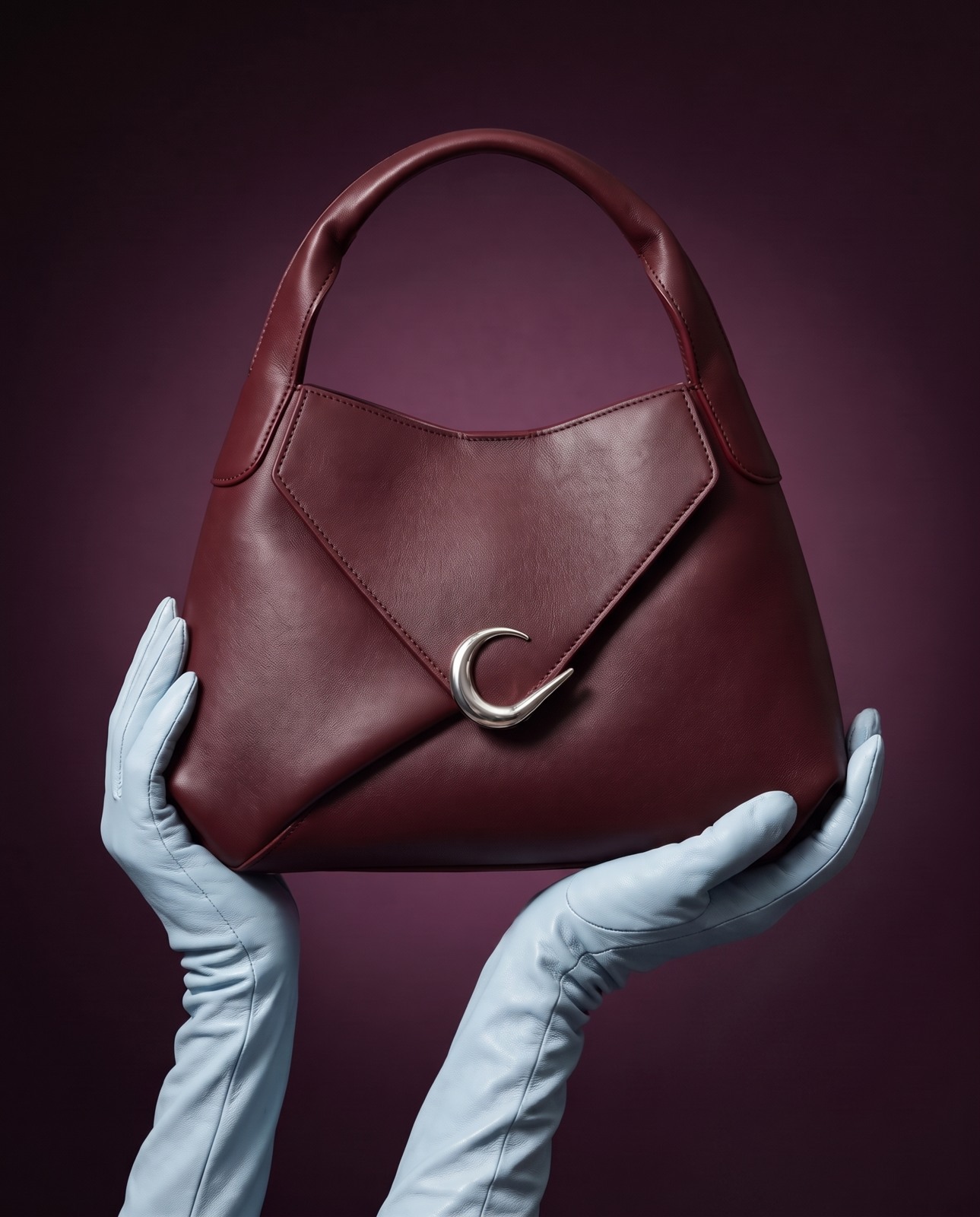
Leather texture, metal reflections, soft gloves. Learn to direct the details that make an AI image feel photographed.
THE IDEA DOESN’T NEED A PRODUCTION CREW
Create product-page images, launch visuals and social content with the product you already have. Start with a few clear reference photos.
Explore the location, lighting and styling from your laptop. Keep the direction you love and build the next image around it.
Learn to package a set of images, estimate your costs and pitch the work. Use the same process for another product and brand.
MADE WITH AI. DIRECTED WITH INTENTION.
A fashion editorial. Sculptural sunglasses. A chrome espresso maker. These AI-generated examples show the kinds of scenes you’ll learn to build, check and refine.
Burgundy leather against liquid-like chrome and a pale green studio backdrop.
The same bag paired with burgundy tailoring, photographed against pale stone.
Cobalt pleats, silver trousers and volcanic rock give the bag a bold editorial setting.
Powder-blue gloves frame the leather texture and silver clasp against a deep plum backdrop.
Sculpted silver emerging through pearl-white latex. A clean silhouette with a tactile twist.
A close portrait brings the silver frame, skin texture and sculptural hinge into focus.
Deep blue architecture and warm shadows frame the chrome espresso maker.
A tight brewing detail pairs polished metal, warm porcelain and fresh espresso.
AI-generated campaign examples: OXBLOOD accessories, sculptural sunglasses and a chrome espresso maker.
Start here: prepare your product photos ↗
Learn what to write, where to generate, and how to fix the details before you publish.
FROM YOUR FIRST UPLOAD TO YOUR FINISHED CAMPAIGN
Ten written lessons show you each step, even if you’re new to AI. Set up the tools, copy and adapt complete prompts, compare the results, and practise on your own product. No guessing what to do next.
Take clear reference photos and record the shape, materials and label. Make a simple test image before adding a dramatic scene.
Decide on the lighting, colours, setting and mood. Turn your inspiration into specific instructions the AI can follow.
Use the 11-part prompt framework and complete examples to describe the product, camera, light, textures and background.
Set up the connection once. Let ChatGPT choose a suitable model, prepare the image and guide revisions in the same conversation.
Spot changed labels, odd reflections and incorrect shapes. Learn when to edit the image and when to restore the original branding.
Place the product in a hand or with a person. Check fingers, contact, scale and skin so the interaction looks believable.
Create a main image, a second setting and a detail shot. Keep the product and visual direction consistent across the set.
Prepare crops for your store, social posts and ads. Leave space for copy and check the exported files.
Follow a real seven-second, silent VESPER example. Copy the motion prompt and check the product from the first frame to the last.
Put together a clear service package, account for generation and editing time, and write a pitch for a potential client.
Keep the lessons and prompts. Come back whenever you have a new campaign to create.
LESS COPYING BETWEEN TABS. MORE CREATING.
Connect Higgsfield to ChatGPT and direct your campaign in plain language. The course walks you through setup, reference uploads and your first generation.
Describe the picture you want. ChatGPT can check the available Higgsfield models and choose a suitable fit for your references, style and budget. You review the proposed image and credit cost before generating.
Use complete examples for the first image, a targeted correction and the next campaign shot. Learn to describe the exact problem, so each revision has a purpose.
Compare each result with your original photos. Approve one generation at a time, check the label and shape, and keep the prompts that work. The course also explains the manual workflow if you prefer the Higgsfield website.
GET THE COURSE. KEEP THE SKILL.
AI PRODUCT CAMPAIGN LAB / BY NIK VANDERKAMP
Get lifetime access to the complete AI Product Campaign Lab. Work through the lessons at your own pace, then reuse the process for your brand or client work.
$29 USD · one-time purchase
One payment. Lifetime course access. Written instruction with visual examples and a short video demonstration—not recorded video classes. AI subscriptions and generation credits are purchased separately.
Explore the ten-lesson course in this local preview. The order flow is a demo; live purchases are not open.
A FEW THINGS BEFORE YOU START
No. Start with the first lesson. You’ll learn which tools to use, how to prepare product photos, what to paste into the chat and how to judge the result. A phone camera is enough to begin making your reference set.
A course. You learn to create the images yourself, using your own product. You get written lessons, complete prompts, examples and optional exercises. For custom production, visit Nik’s services.
Think of $1 as a possible generation budget, not a fixed price for a finished image. For example, five attempts at $0.20 each would cost $1 in generation fees. That is an illustration, not a quoted Higgsfield rate. Your actual cost depends on the plan, model, settings, retries and editing. The course teaches you to check the cost before generating; tool subscriptions and credits are separate from enrollment.
Use it to create campaign scenes and test ideas without arranging a full production day. Some work still calls for photography: exact product evidence, fit, colour-critical details or a client brief that requires it. You’ll learn to check the AI output against the real product before using it.
That’s a central part of the course. You’ll work from your own references, check shape and materials, and repair changed details. AI can still alter labels and proportions, so you’ll also learn when to restore real branding with an edit.
A computer, product reference photos, and access to ChatGPT or Higgsfield. The recommended connected workflow uses ChatGPT with an active paid Higgsfield account. Setup and a manual alternative are explained in the course. Their subscriptions and generation credits are not included.
Course access is lifetime with a one-time payment. Learn at your own pace and return when you need a prompt or a refresher. Exercises are optional, so you can mark a lesson complete without filling every answer.
The last lesson covers packaging, costing and pitching your work. Check the commercial-use terms of your chosen tools and use product assets you’re allowed to work with. Client bookings and sales aren’t guaranteed.
Email hello@nikvanderkamp.com. Read the refund policy and course terms before buying.
SEE HOW THE COURSE TEACHES
See how a product image is reviewed and corrected. Follow the prompts and the decisions behind the edit, so you know what to do when your own image needs work.
See a worked example ↗Written, self-paced teaching. Generate in your own external AI tool.
THE CAMPAIGN YOU KEEP IMAGINING